
Summary Tab
This tab gives you all relevant information about the upcoming comparison. Depending on your current configuration, you will see more or less lines.
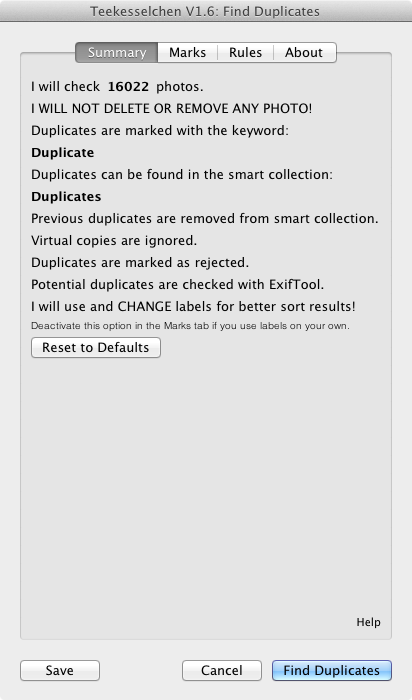
The Summary tab
Push the button "Reset to Defaults" if you have made changes and want to return to the default settings. The button "Save" at the extreme bottom allows you to store your changes without a run. If you use the "Cancel" button then all your new settings are lost. Push the "Find Duplicates" button to store your settings and to kick off the comparison. A dialog with a progress bar will pop up and inform you about the state of the process.
Go to old version 1.5
Suddenly the program stopped loading . Listed as a plugin. says its running but when I click on plugin extras its not there. Windows 10 and lightroom 2015.5
Is the plugin enabled? Otherwise I would remove and reinstall it.
Same, here, plugin enabled, but no way to run it - does not appear in plugin extras ... W10 2015.5.1 LR
Can I ask the method it uses for finding duplicates? Perhaps a hash of the file?
The algorithm is pretty easy. It just compares the available meta-data and it does not compare the binary content of the image. The number and order of the meta-data comparisons can be configured by the available options. If the same image comes with different meta-data then not duplicate can be found.
Does LR actually change the metadata of the raw files? I thought the entire point was that it didn't do that.
No, it does not change the metadata of the raw files. This data is stored in the catalogue file of Lightroom.
Plugin Installed and enabled but does not show up in plugin lists. Windows 10, CC2015. Have reinstalled, re-enabled, restarted LR, rebooted. Multiple times. No Joy.
Just deleted about 6400 duplicates in LR6. Works fine, thanks a lot!
is there a way to undo/unmark the duplicates which were found?
Does the latest version work with the most current version of Lightroom? Thanks.
Yes it does. I am running Lightroom CC Version 2015.12 at the moment and have no problems.
Thank you!
The Plugin doesn't work with the nes Lightroom Classic CC :-(
That's my experience today, too. I get a message that the plugin installs successfully, but it is nowhere to be found when I try to add it to the Plug-in Manager.
Worked perfectly for me, but I had to install it via the plugin manager, which is very simple and documented here.
The pkg didn't work.
- MacOS High Sierra 10.13.2
- Plugin version 1.8
- Lightroom Calssic CC Version 7.1 release
Everything fully updated as of Feb1, 2018
Hello and thank you very much for the plugin! Works really great!
I have one question though, is the plugin able to find similar pictures? I mean, not only duplicates, but also similar pictures? If not, do you know another plugin that does the job?
Thank you once again!
I have downloaded and installed v1.8 on my iMac 5K, Radeon 580, 32gb RAM, 1TB SSD - OSX10.12.6 in LR Classic CC.
While it shows it's enabled in the Plug-ins manager, it does not show in the Plug-ins Extras Menu.
Am I missing something, or not looking in the correct menu for the plug-in? https://uploads.disquscdn.c...
I have the same problem. MacBook Pro running latest OSX.
I just found a fix--sort of. In File | Plug-In Extras, this plugin does not appear. However, in Library | Plug-In Extras, it does! Use that!
I have been using this plug-in and love it, but now it doesn't work anymore.. I have tons of duplicates, but the plug-in can't find any. i think it is due to the labeling the plug-in has made. I have abuse lables selected but I think it still goes by the old labels.. How do I fix this? removing the labels manually is to slow as I can only seam to do it for 1-4 files at a time and I have over 80000 photos..... PLEASE help
I have not been able to use the software, as the file will not go Lightroom CC I have downloaded the file several times but it will still not show up in the plug in manager. If you can help that would be great. Thanks Terry Goan terrygoan@gmail.com
I found that when I downloaded the software it put the teekesselchen file in a spot that LR couldn't find it. I searched for the file on my computer and then dragged it to my LR folder in my Picture folder. It still didn't load, but when i went to File - Plugin Manager I could manually add it as I now knew where it was located. Once I manually added it, it worked fine. Hope this works for you
This found a lot of duplicates in my catalog. Many I understand as in the duplicate file there are two photos, one flagged for deletion based on my rules. But it also shows a number of files flagged for deletion with no corresponding duplicate. Why would this occur?
Most of the items here appear to be old, is this blog still active?
Worked very well with my LR Classic CC. Thanks for the free software! I am going to make a deserved donation soon.
hallo,
gibt es das Tutorial und die Dokumentatiun auch auf deutsch?
Well - I tried to make a donation. Apart from everything being in German, the thing that stopped me was that I could not find the region - England, or United Kingdom, or Great Britain. Any ideas?
I also tried to run the program again but cold not as it is now greyed-out as a plug in. What do I need to do to get it working again. An excellent product.
Hi guys. Your software finds lots of duplicates, but when I go to the Duplicates folder, I can not delete the found duplicates. What am I missing? Please e mail me if you get the solution, as I am not so often on this site: Odyssey@mail.dk. Thanks folks. ;)
You can't delete from the duplicate folder, you must go back to the catalogue, then Photo > Delete Rejected Photos ... . LR does not allow the use of this menu item in smart collections.
Thanks guys. I just lost my whole library of 17000 pics
no backup? dagnabbit
Again:
Teekesselchen > Rules Tab: If "Use ExifTool" is checked and "Ignore virtual copies" is unchecked, where does Teekesselchen search for Exif tags of virtual copies? Is it searching the Exif tags of the master photo (and if this is true: of the stored master photo itself or only within the Lightroom Classic database?) or is it searching the Exif data of the virtual copy in the Lightroom Classic database?
I would like to distinguish virtual copies (from one another and/or from the master photo) by different crop widths and heights. If the use of ExifTool works for that, what tag will I have to use?
Appreciating any hint in advance.
https://uploads.disquscdn.c... Great Extension, but: I'm sorting images from a data rescue. So it helps me a lot to throw images in and then check for duplicates. But very often it wants to delete the new picutres and keep the missing ones. So in the adjustments there thould be over "raw" and "dng" as number 1 "keep not missing instead of missing"